Prescription writing: complete OPD and revisit guide
A practical guide for reception and doctors: record vitals, write a fast mobile prescription, reuse personal templates, review medicine changes, recover drafts and print.
Step by step
1. Open the right patient and start a visit
- Open Clinical care → Doctor workspace, find the patient and choose Write prescription. Prescription list opens saved prescriptions; it is not the new-visit editor.
- Check patient name, RV patient ID, clinic location, consultation date and prescribing doctor. Select Department and Visit focus for the relevant examination form.
- A normal new prescription starts with blank visit findings and medicines, while saved allergies and past medical/surgical history load automatically for review. Source links identify the recorded background. Verify and update it for today; current pregnancy status/dates and earlier vitals are not background defaults.
2. Reception records vitals before the doctor
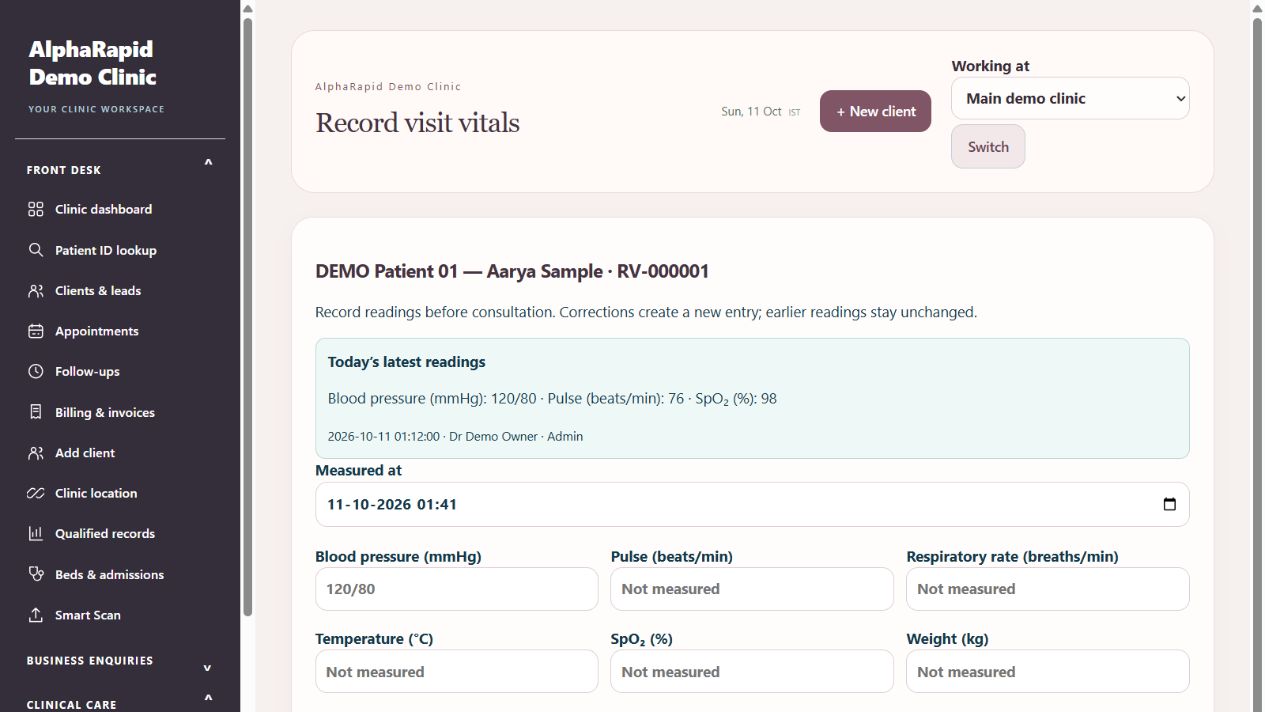
- Reception opens Front desk → Appointments. Eligible visit cards show Vitals pending or Vitals recorded; use Record vitals / View readings. You can also use Record vitals from the patient record.
- Confirm patient/location and measured time. Enter available BP, pulse, respiratory rate, temperature, SpO₂, weight and height in the displayed units. Leave unmeasured readings blank, then Save vitals.
- Corrections create another entry, retaining earlier readings. Recording vitals does not give reception access to clinical notes or prescription writing.
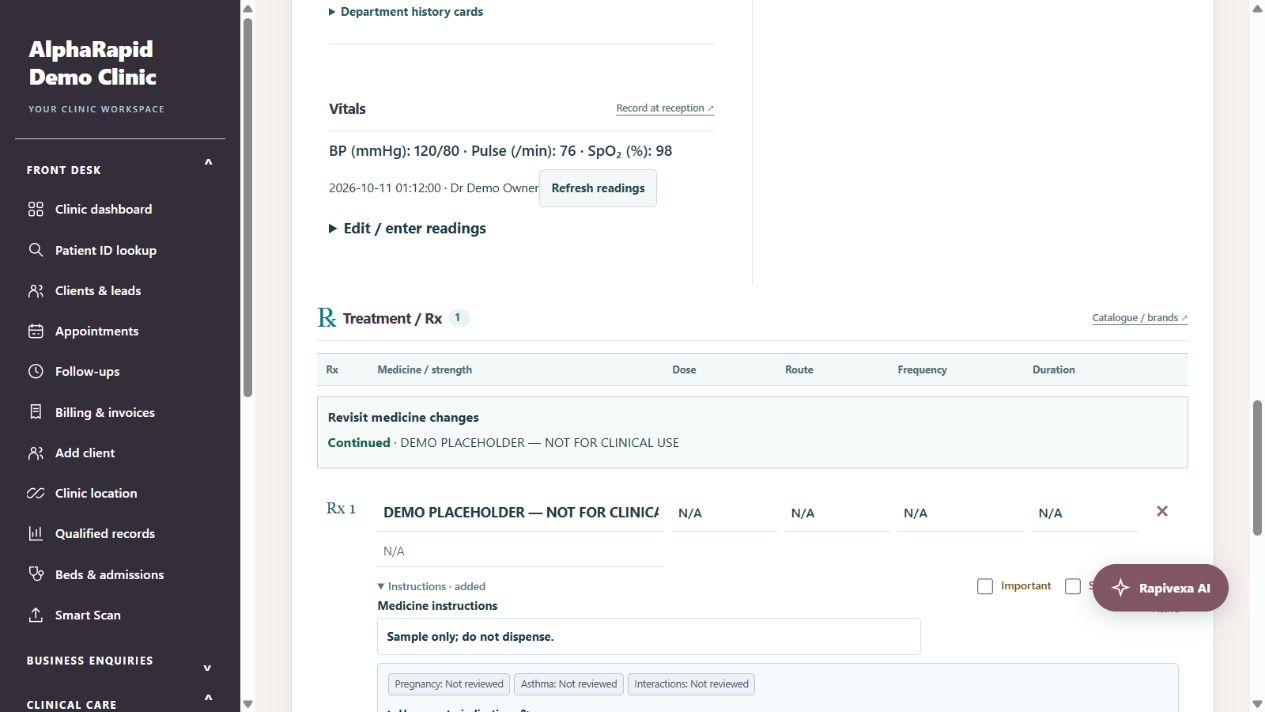
- The doctor sees current-visit readings with recorder and time. Use Refresh readings for measurements saved after the draft was opened; replacing existing draft readings asks for confirmation. Changing consultation date clears readings. A saved prescription keeps its own snapshot.
3. Quick OPD and mobile navigation
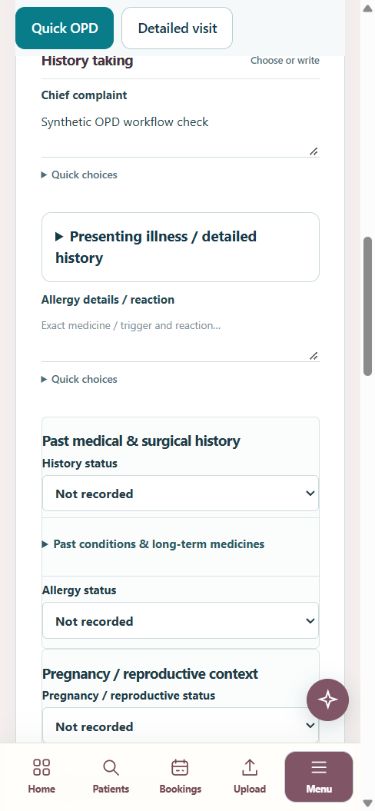
- Quick OPD is selected by default. Chief complaint, allergy/history status, clinical assessment and Treatment / Rx are easy to reach; expand additional details as needed.
- Use History taking, Examination, Investigations & diagnosis, Treatment / Rx and Review & save links to jump to the required section on a phone.
- Choose Detailed visit to show the full sheet when needed. Collapsing a section changes its display; review any values already entered there before saving.
4. History, examination and diagrams
- Enter Chief complaint, then expand Presenting illness / detailed history for Presenting illness and History of presenting illness. Quick choices help enter common concerns; edit the wording for this patient.
- Record Past history status and condition cards, current/past/under-treatment details and long-term medicines. Record allergy status separately with the actual medicine/trigger and reaction. Blank means not recorded.
- Open Department history cards and Examination & diagrams. Enter relevant department findings. For obstetric visits, review pregnancy status, G/P/A/L, LMP, clinician-confirmed EDD and dating basis rather than copying unverified dates.
- Choose an appropriate diagram card, specify patient LEFT/RIGHT and view, add marks/notes and select the print choice. New visits and medicines-only revisits start without diagrams. Explicit full prescription copy can bring old diagrams into the editable draft; review or remove them.
Department history and pregnancy details → All diagrams and annotation guide →
Back to guide contents ↑5. Investigations and clinical assessment
- Open Investigations & differential diagnosis. Select relevant investigation or differential cards and edit/add free-text details for the encounter.
- Complete Clinical assessment before Treatment / Rx. These are clinician-entered findings and requests; selecting a card does not make or confirm a diagnosis.
Investigation and medicine-group guide →
Back to guide contents ↑6. Write medicines in the numbered Rx rows
- In Rx 1 Medicine name, type at least two characters of the generic or a saved brand name. Choose the exact medicine/formulation from suggestions. Arrow keys and Enter work; Escape closes suggestions.
- Check filled medicine name, strength and route. Strength is not the prescribed dose. Enter the patient-specific Dose, Frequency and Duration, then expand Instructions if needed. Add medicine row creates Rx 2, Rx 3 and further rows.
- Browse drug catalogue / brands provides another search route. Medicine groups are references for selecting entries; they do not automatically prescribe a complete treatment regimen.
- Important highlights an active medicine in amber. Stop / discontinue is red, marks a stopped medicine and excludes it from the active printed Rx. Remove deletes only that row from this unsaved draft.
- Review visible medicine information, pregnancy/asthma filters and duplicate-name notices. Grey means Not reviewed; green is supported for its stated use, not universally safe. Verify patient history, other medicines, formulation and current instructions.
- An active named medicine missing dose, frequency or duration shows an amber warning. Attempting to save asks for confirmation; an incomplete saved prescription also flags missing fields. Prefer completing the intended instructions before saving.
Medicine reference and risk filters → Medicine groups and catalogue →
Back to guide contents ↑7. Revisit: change only the required medicines
- Choose Change medicines only, or Use medicines for new visit beside the intended saved prescription. Confirm the source visit and use Open source when you need the original.
- Medicine schedules and background history are copied for review. Current symptoms, assessment, examination and diagrams start blank; old visit vitals are not automatically copied.
- Keep unchanged rows, edit the required dose/schedule, add a medicine or mark Stop / discontinue. Revisit medicine changes shows Continued, Changed with before/after values, Added, Stopped or Removed.
- Use Copy previous prescription for review only when you want the fuller editable copy, including old diagrams and notes. Review every copied field. Start a blank prescription instead clears the copied draft.
- Saving creates a separate prescription for this visit. Earlier saved prescriptions are unchanged.
8. Save and apply your consultation templates
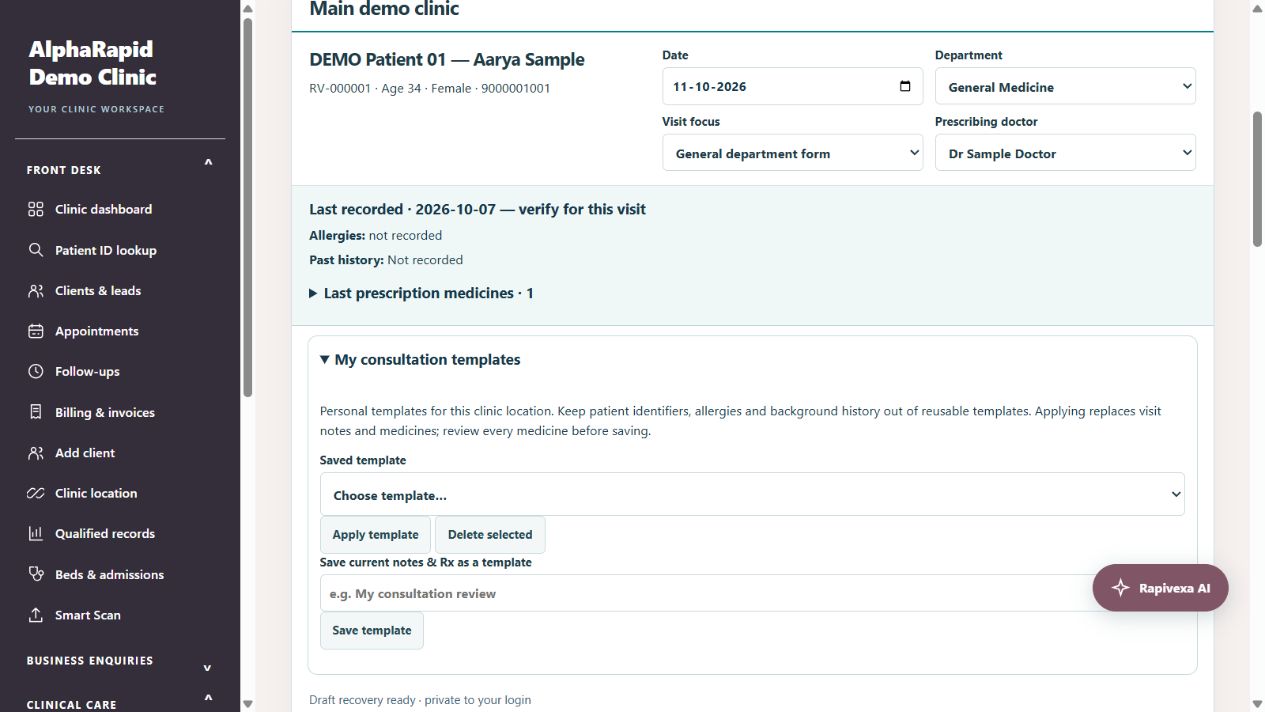
- Open My consultation templates near the patient header. Prepare reusable visit notes and Rx, enter a clear template name, then choose Save template and confirm.
- Patient identity, background history, allergies, vitals, diagrams and clinician approval are excluded. Do not put patient identifiers in free-text reusable notes. Templates belong to your login and the current clinic location.
- Choose Saved template → Apply template. Confirm replacement of this draft’s visit notes and medicines. Patient history and vitals stay; clinician approval resets. Review all medicines for this patient.
- Use a different name for another template; duplicate names are rejected. Delete selected removes the selected personal template after confirmation, without changing saved prescriptions.
9. Recover an unfinished draft
- Edits autosave privately to the server after a short pause. Check the status line for Draft saved. It is a recovery draft, not a finalized prescription.
- When reopening this patient, choose Restore my draft to recover it, or Discard saved draft to start fresh. The recovery window is 48 hours for the same staff login and clinic location.
- Restoring does not restore clinician approval. Check date, patient details, readings, diagrams and every medicine again. Successful Save & preview clears the matching draft.
- If the status says Draft could not be saved, keep the editor open and retry after connectivity is restored. Avoid editing the same patient draft in multiple tabs.
10. Review, save and print
- Enter Advice / care instructions and the clinician-selected follow-up date. Review the draft including expanded/hidden sections and copied history.
- Confirm patient, doctor, current findings, allergies, medicine suitability, doses, frequency, duration and instructions. Tick the clinician review checkbox, then Save & preview prescription.
- In the preview check active Rx, discontinued medicines, vitals attribution, department findings, diagram labels/print choices and clinician information. Review before printing or sharing.
- Use Clinical care → Prescription list to find saved prescriptions, or the patient’s Previous prescriptions section. Open the intended saved visit before printing.
11. Common questions and quick fixes
- Why is a medicine already present? Check whether you opened a revisit, applied a template or restored a draft. Use Start a blank prescription instead when you want an empty visit.
- Why is yesterday’s BP not shown? Readings are tied to the consultation date. Record today’s readings or explicitly review the intended visit date; old vitals are not treated as new.
- Why are old diagrams missing? Medicines-only copy excludes diagrams. Use the explicit full prescription copy and review its charts, or add a suitable chart for today.
- Why is there no brand suggestion? Only generic names and saved catalogue brands can be matched. Check spelling and the clinic catalogue; select the exact formulation.
- Why must I tick review again? Editing or restoring an unfinished prescription resets approval so the doctor reviews the final values.
- Does the warning guarantee a correct prescription? No. Missing-field, reference and selected interaction notices help review; they are not a complete dose or drug-interaction validation system.
Keep in mind
Rapivexa records clinical work; it does not replace clinical judgment. Medicine choice, dose and instructions must be verified by the clinician.
The default editor opens as a blank paper-style sheet. Search to reveal matching medicine cards or choose Browse catalogue. Expand quick choices, past conditions or medicine tools only as needed. Selected-medicine safety warnings and clinician confirmation remain visible.
Related guides
Record vitals before consultation
Front-desk readings appear in the doctor’s prescription draft.
Read guide →Patients & careAdd visual charts to a prescription
Select a location chart, mark findings and choose whether to print it.
Read guide →Patients & careMaintain the medicine catalogue
Keep reusable medicine information accurate.
Read guide →Patients & careReview a patient profile and history
Use the patient record to follow previous care.
Read guide →Patients & careManage medical documents and lab reports
Attach records to the correct patient and review uploaded results.
Read guide →Patients & careSmart Scan: physical reports to digital records
Scan a photo or PDF, check the transcription and send it for clinical review.
Read guide →Patients & careRecord past history and department concerns
Use selectable history cards across all 15 specialties, then review the information before saving.
Read guide →Patients & careFind medicines by disease or category
Browse 45 searchable medicine groups, then review individual formulation and schedule entries.
Read guide →Patients & carePregnancy, asthma and medicine review filters
Filter source-supported formulations, review restrictions and check the recorded patient context before prescribing.
Read guide →Patients & careDifferential diagnosis, investigations and medicine groups
Document suspected conditions separately, request investigations and choose individual medicine references.
Read guide →Still need help?
Send your clinic code and the exact issue. Keep passwords and patient information private.
Request setup help · Free All guides