Differential diagnosis, investigations and medicine groups
Document suspected conditions separately, request investigations and choose individual medicine references.
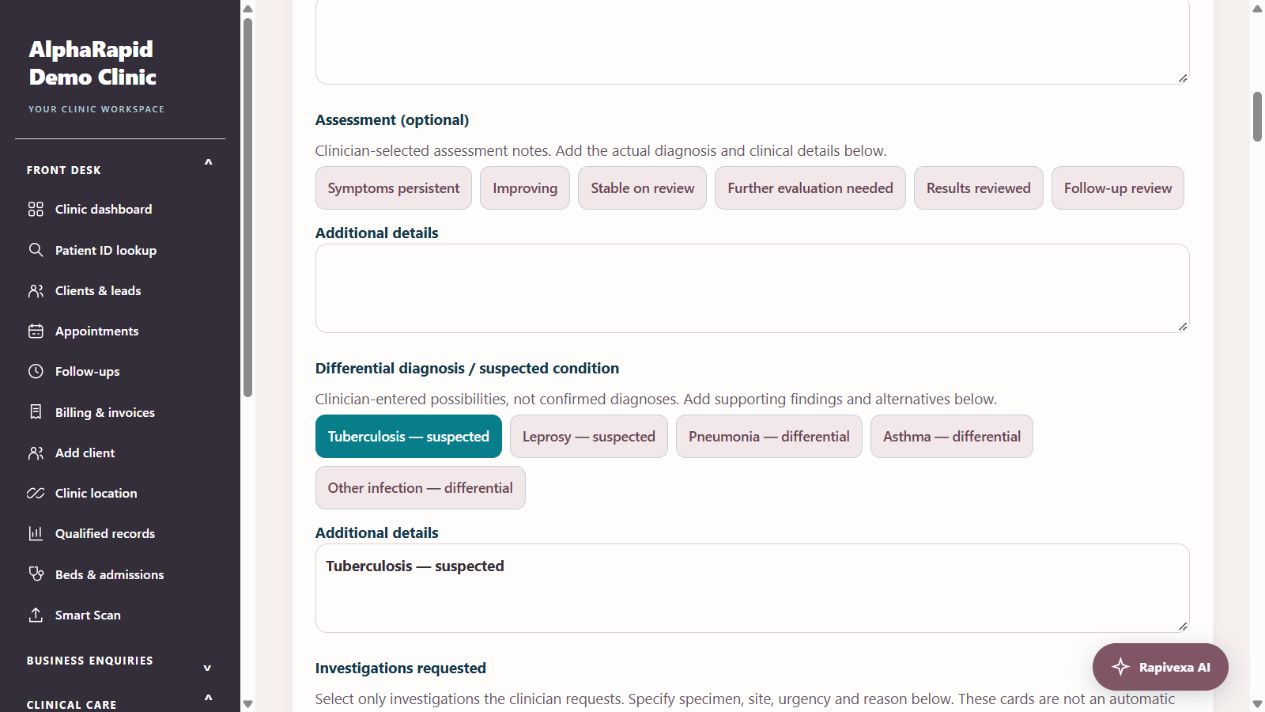
Step by step
- Open Clinical care → Doctor workspace → Patient → Write prescription. In Consultation, record Differential diagnosis / suspected condition with the clinician-selected cards or your own text. These entries remain suspected possibilities, not confirmed diagnoses.
- In Investigations requested, select tests and enter the specimen, site, reason and urgency. These are clinician-selected requests, not tests recommended automatically from a diagnosis. Requests save and print but are not sent to a laboratory.
- In Prescription medicines → Medicine groups, choose TB medicines or Leprosy medicines. This filters the individual medicine cards without adding any medicine automatically.
- Add only the individual medicines chosen by the clinician. Generic references have no fixed formulation or schedule: enter strength/formulation, dose, route, frequency and duration before saving. Group selection is not an automatic treatment regimen.
- Review the differential, requests and all medicine entries, complete clinician confirmation, then Save & preview. Check the printed request details. Differential diagnosis and investigation-request fields start fresh for a new consultation.
Keep in mind
The TB group is a selected first-line medicine reference and does not cover all regimens, drug resistance or patient eligibility. Leprosy medicine references are not an automatic MDT prescription.
This feature does not check all drug interactions or contraindications and does not establish that a dose or prescription is clinically correct.
Related guides
Prescription writing: complete OPD and revisit guide
A practical guide for reception and doctors: record vitals, write a fast mobile prescription, reuse personal templates, review medicine changes, recover drafts and print.
Read guide →Patients & careRecord past history and department concerns
Use selectable history cards across all 15 specialties, then review the information before saving.
Read guide →Patients & careReview a patient profile and history
Use the patient record to follow previous care.
Read guide →Still need help?
Send your clinic code and the exact issue. Keep passwords and patient information private.
Request setup help · Free All guides