Clinic management software for authorised care teams: appointment scheduling, clinician documentation, billing, patient communication and follow-ups. Explore the software workflows and real product screens.
One patient history Role-based access Clinic-branded prescriptions
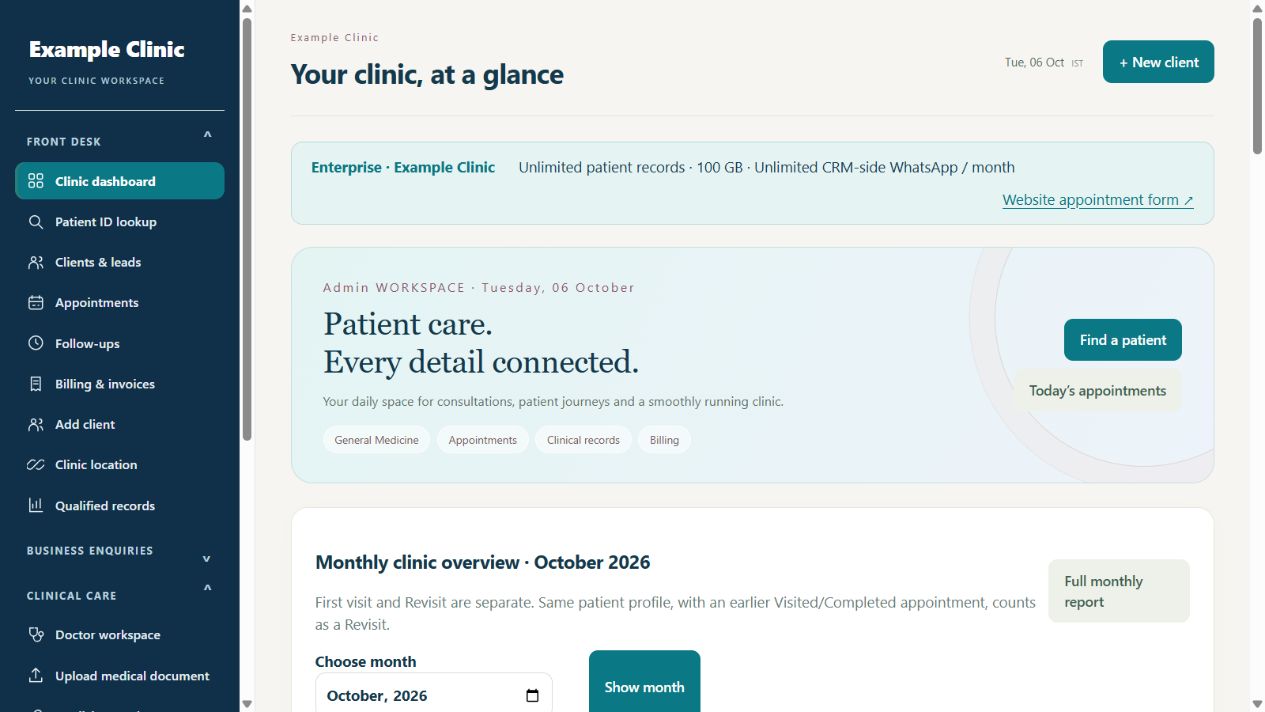
A REAL WORKSPACE. A CLEARER CLINIC DAY.See the appointments, follow-ups and clinic activity your team needs today.Actual Rapivexa screen · Fictional clinic & sample data
Built for doctors. Ready for the whole front desk.
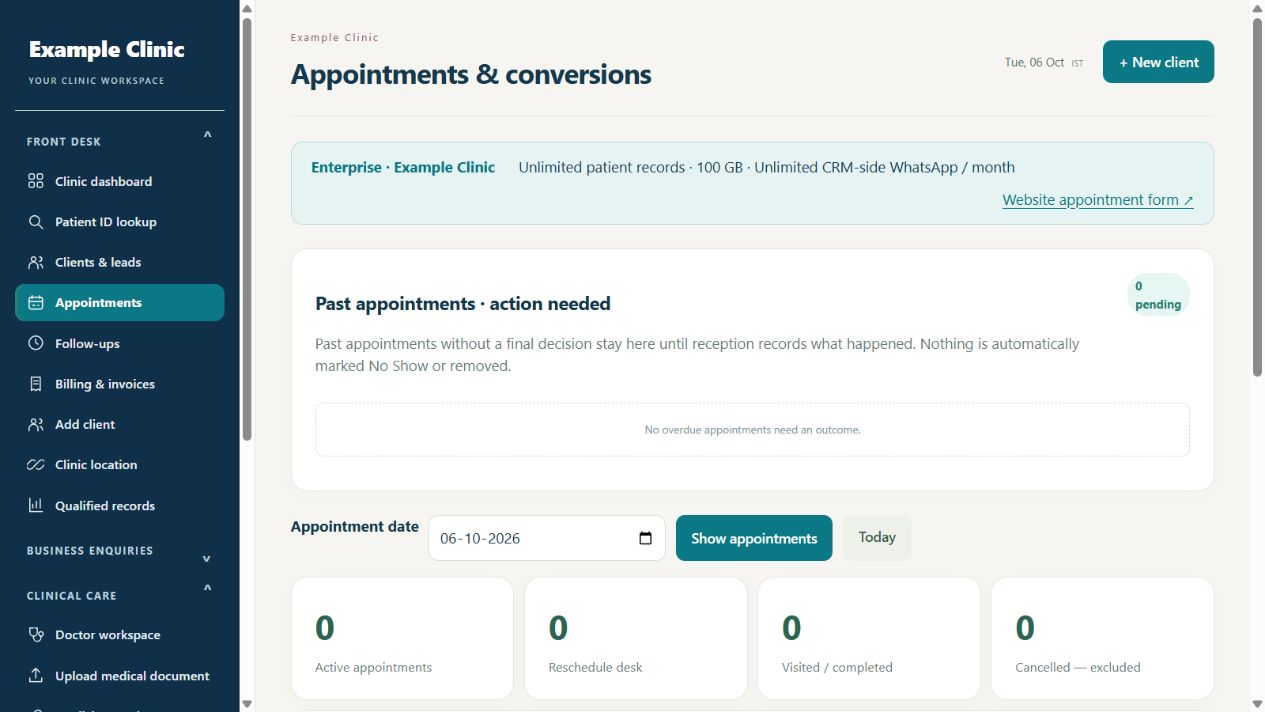
Keep the day moving
Review pending bookings, find a patient and record the next action.
Keep clinical context close
Consultation history, prescriptions and visual charts in one workspace.
Keep the return visit in view
Due follow-ups and configured reminders your reception can coordinate.
START WITH WHAT MATTERS TO YOU
See the work. Then see the tools.
Find the part of your clinic day you want to improve. Explore the details below, with actual screens and clear setup requirements.
Keep the clinic’s communication preferences with each client.
Record email marketing and WhatsApp consent separately.
Honor email unsubscribe requests and WhatsApp STOP or UNSUBSCRIBE replies.
Exclude opted-out or deleted contacts from eligible queued messages.
Use the selected campaign’s audience and stop rules before sending the next email.
Messaging and campaign tools depend on your selected plan, configured provider account, consent and approved templates. Provider usage charges may apply.
COMMUNICATION WITH A PURPOSE
Useful reminders. Considered clinic updates.
WhatsApp
Appointment updates & opted-in broadcasts
Approved templates include patient, appointment and clinic variables. Your team can follow replies and delivery status in the shared inbox.
Consent checkedTemplate approved
Email
Branded campaigns & scheduled sequences
Choose an eligible audience, prepare the message and schedule the next step. Respect unsubscribe preferences along the way.
Illustrative interface · Fictional clinic & sample data
THE PATIENT’S SIDE OF THE JOURNEY
Your clinic connection, beyond the waiting room.
Online care is part of the clinic workflow: the right doctor, a clear appointment, an accepted consultation and the patient’s permitted records.
A personal clinic booking page
Clinic branding, doctor profiles, appointment types, location and contact details. Patients can register, log in and request a suitable visit.
Clinic-specific patient IDs connect the login to shared prescriptions, medicines, treatment history and upcoming appointments.
Only records permitted for that patient are available.
WebRTC telehealth: video, audio & chat
Patient consultation requests, doctor acceptance and configured audio/video or text sessions. Clinic-set fees and patient wallet controls follow the saved setup.
Requires the appropriate plan and enabled calling/payment configuration.
FOR THE REAL RHYTHM OF OPD
Write less from scratch. Keep the context that matters.
Choose quick OPD or a detailed visit. Reception can record vitals before the consultation, while the doctor reviews the history and treatment.
Prescription documentation for clinicians.
Structured history, selectable notes and medicine rows keep writing organized. Revisit workflows let the doctor review earlier medicines and change the ones that need changing.
Authorized reception staff can enter the readings so they are available to the doctor. The clinician reviews the recorded context before completing the prescription.
The clinic-configured medicine catalogue and reviewed labels support documentation by authorised clinicians. Unreviewed medicines remain clearly marked; no filter guarantees safety for every patient.
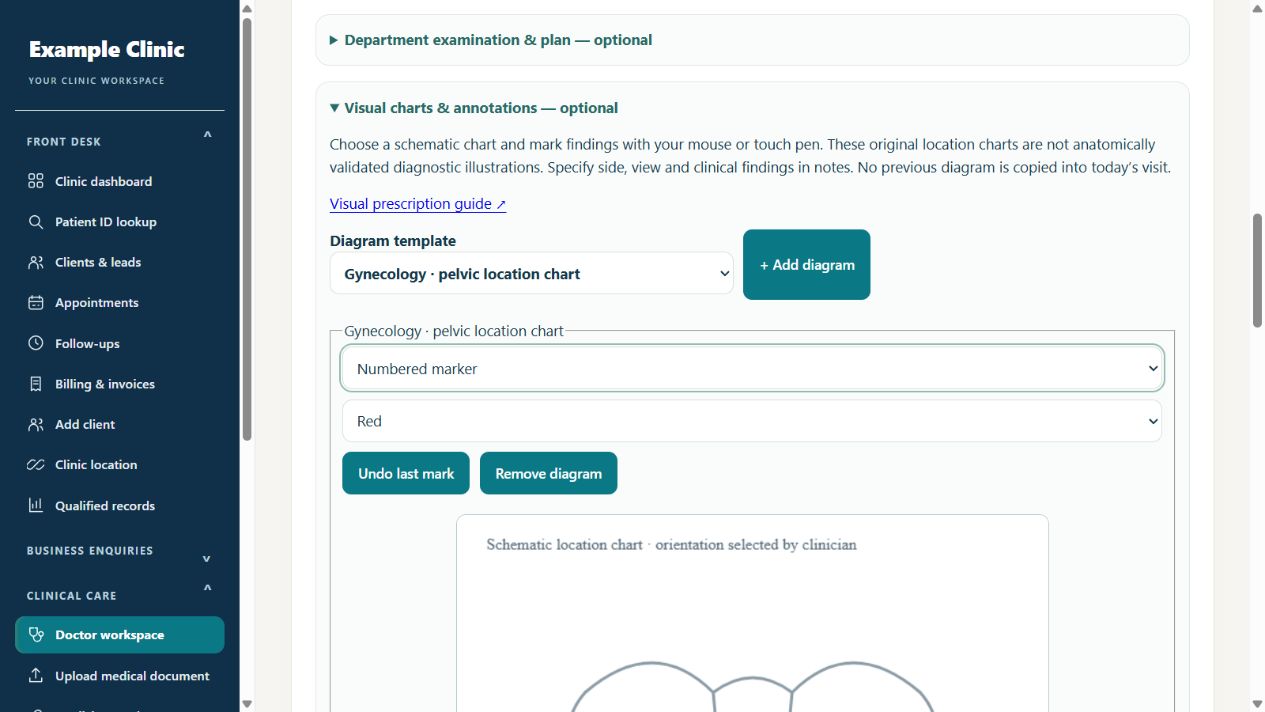
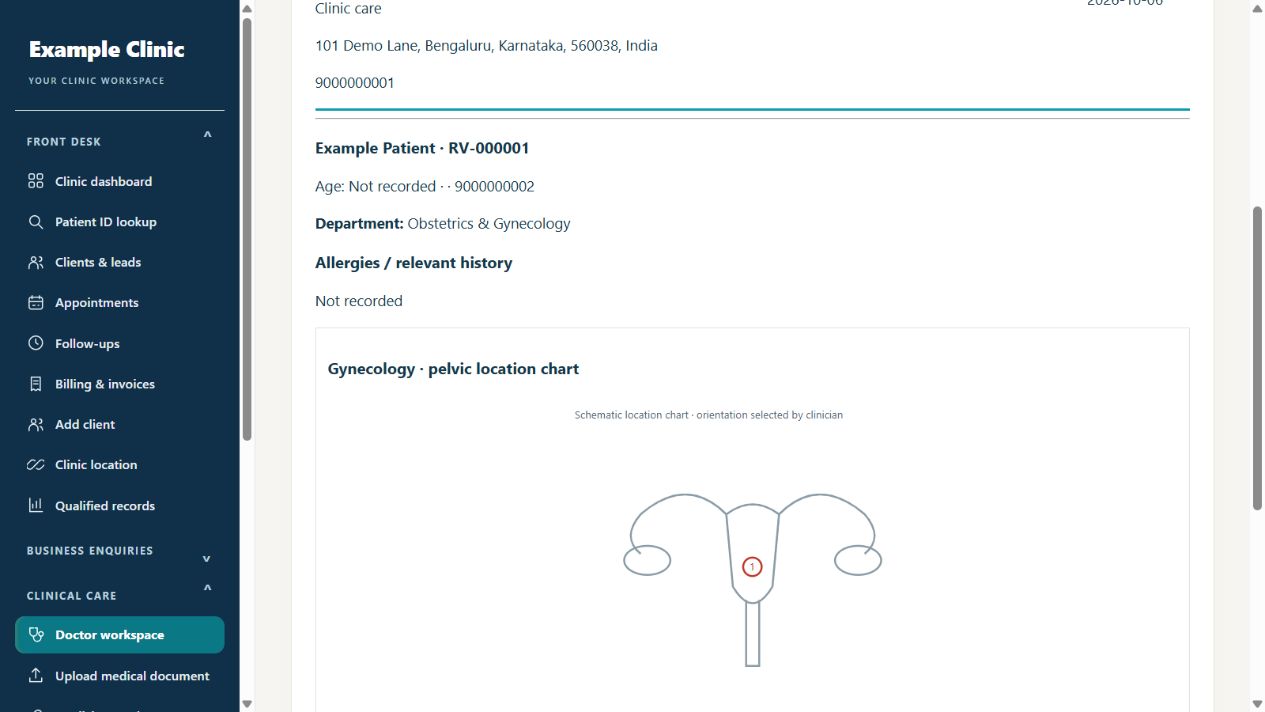
Add a suitable schematic chart to a prescription and mark it with a pen, arrow, circle or numbered marker. Your notes give the mark its clinical context.
A specialty chart library with body, eye, surgical, aesthetic and pregnancy-related location charts.
Choose whether the chart appears on the printed prescription.
Earlier charts stay with their saved records for visit-history review.
These are schematic location charts, not validated diagnostic illustrations. The clinician reviews every finding, medicine and instruction.
Review the saved chart and notes together before printing.Actual Rapivexa screen · Fictional clinic & sample data
AI WITH A PRACTICAL ROLE IN YOUR CLINIC
Find the record. Prepare the next step.
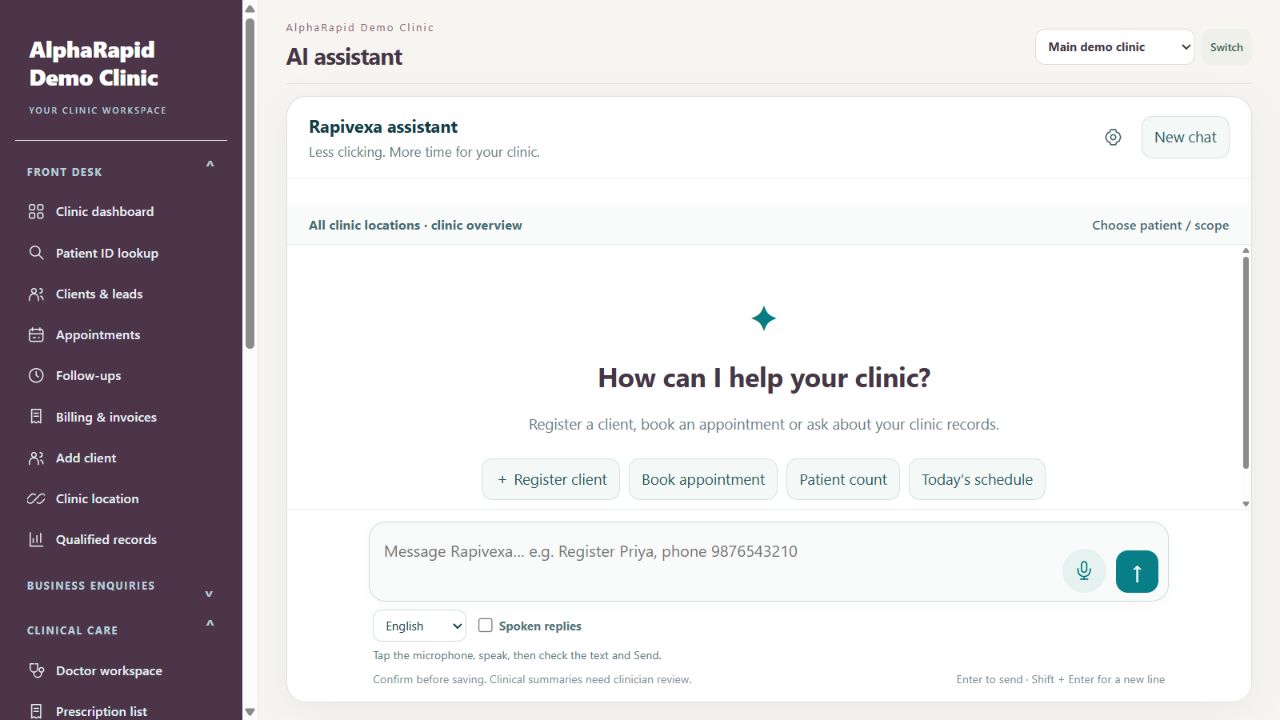
Ask about permitted patient records, appointments and follow-ups. Prepare a new registration or booking, then review the details before your team saves it.
Clinic record lookup Appointment preparation Voice & chat
Available when enabled and configured, with clinic approval and staff permissions. Clinical summaries require clinician review.
A practical assistant, inside the clinic workspace.Actual Rapivexa screen · Fictional clinic & sample data
PRACTICAL HELP FOR THE WHOLE TEAM
More than an appointment book.
Give your clinic the tools to organize its work, with clear permissions and control.
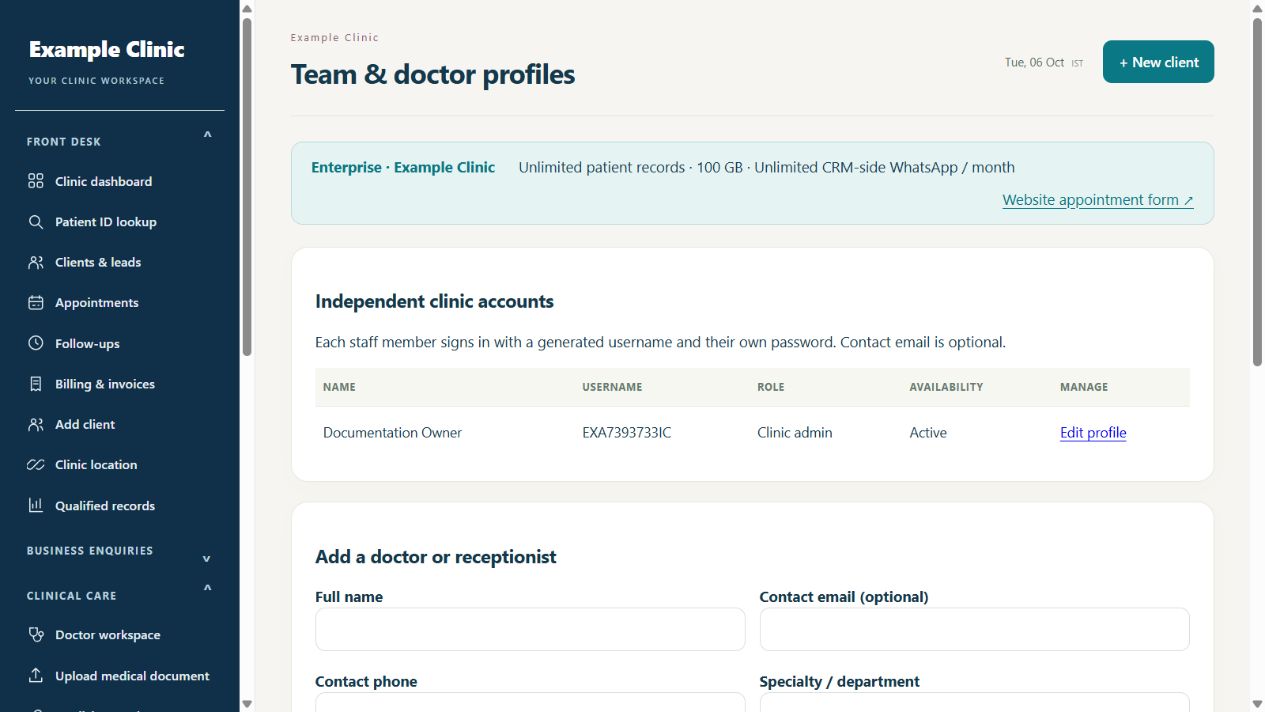
Your team. Your locations.
Individual staff accounts, doctor and reception roles, and location access matched to the selected plan. Enterprise supports clinic logo and colour customization.
Find patient records, check appointments and follow-ups, register clients and prepare bookings in one chat. Use voice input and spoken replies, or open the assistant from CRM pages without leaving your work.
Your clinic controls record-sharing approval; staff permissions still apply. Review and confirm before saving. Clinical summaries need clinician review.
A searchable knowledge base with step-by-step workflows and sample screens for patient records, prescriptions, WhatsApp setup, appointments and follow-ups.
Patient invoices are created inside your clinic CRM. Your software subscription, renewal and software invoices are managed through your AlphaRapid account.
01
Choose your plan
Compare features, currency and monthly or 1–5 year prepaid terms.
02
Add clinic details
Choose the specialty and complete your clinic profile.
03
Verify payment
Starter, Clinic and Enterprise create the clinic and login after verified payment.
04
Set up your workflow
Sign in, review roles and settings, then configure your own provider connections.
Custom CRM starts with a requirements consultation and separate agreed scope. Included features, storage, staff and location allowances vary by plan.
QUESTIONS FROM THE CONSULTING ROOM
Know what you’re choosing.
Clear answers about the clinical tools, messaging setup and account behind your clinic.
Does AlphaRapid provide medical consultations or sell medicines?+
AlphaRapid provides Rapivexa software subscriptions to clinics. Prescription documentation and online consultation tools are operated by each clinic’s authorised clinicians. Medical decisions and care remain with the treating clinic. This website sells software subscriptions, not medical consultations or medicines.
What can the Rapivexa AI assistant do?+
Ask about permitted patient records, appointments and follow-ups; register a client or prepare a booking in chat. Use English or Hindi voice input and spoken replies. Staff review and confirm before records are saved. The clinic admin enables AI and approves sharing once; existing clinic, location and staff permissions apply. Clinical summaries require clinician review.
How do AlphaRapid and Rapivexa work together?+
Rapivexa is the specialty CRM software. AlphaRapid is where you explore the CRM, choose a subscription, manage payments and invoices, and follow the setup journey with our team.
Does every specialty have the same clinical features?+
Appointments, patient coordination and staff workflows form a shared foundation. Eye-care prescriptions, investigations and aesthetic consultation records belong to their respective specialty workflows. Specialty schematic location charts can be selected and annotated by a clinician; they are not validated diagnostic illustrations. Your demo and selected plan confirm the included tools.
Are patient invoices and my software subscription the same thing?+
Patient invoices are created inside your clinic CRM for clinic services. Your Rapivexa subscription, renewal payments and software invoices are managed through your AlphaRapid account.
What happens after I purchase a plan?+
After verified payment, Starter, Clinic and Enterprise create the clinic and generated login automatically. Find the CRM link and credentials in My orders or My CRMs in your AlphaRapid client area. Review clinic details, staff roles and settings, then configure provider connections before messaging. Custom starts with a requirements consultation and separate agreed scope.
How are WhatsApp appointment messages activated?+
During onboarding, we configure your WhatsApp business account, approved appointment templates, consent preferences and reminder timing. Provider setup and usage charges are confirmed for your selected package before activation.
Which channel supports offers and marketing campaigns?+
Use WhatsApp broadcasts to share clinic offers and announcements with opted-in contacts, and branded email campaigns for scheduled offers and multi-step messages. The shared WhatsApp inbox helps your team handle replies. Your demo confirms the campaign tools, provider setup and usage charges included in your selected CRM package.
YOUR WORKFLOW IS THE BEST STARTING POINT
Bring your clinic day to the demo.
Walk through a patient visit, a prescription and the follow-up together. Choose with clarity.