Pregnancy, asthma and medicine review filters
Filter source-supported formulations, review restrictions and check the recorded patient context before prescribing.
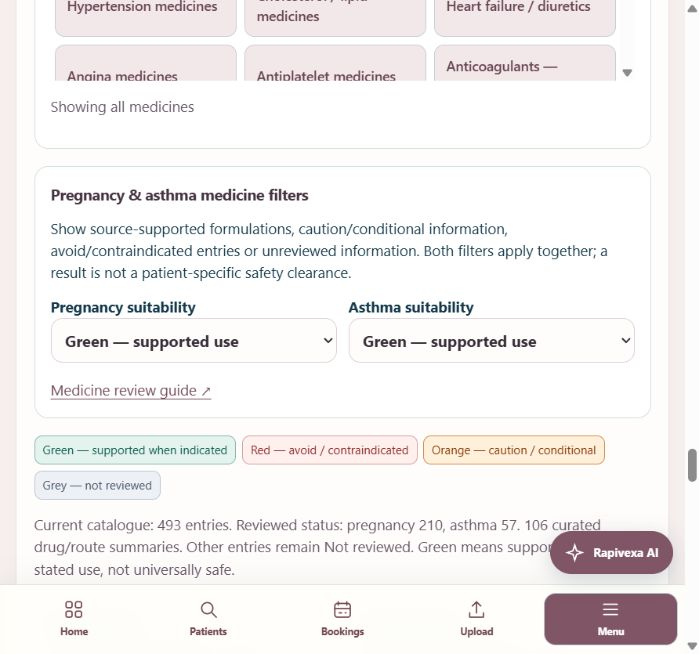
Step by step
- Open Clinical care → Doctor workspace → Patient → Write prescription → Medicines. Expand Medicine groups & safety filters to open the pregnancy and asthma filters. Drug/brand search stays visible in the paper editor.
- Choose Green — supported use to browse the reviewed options for pregnancy or asthma. Both filters apply together; reset either to All risk levels to widen the results. The filtered card contains only matching formulations, so an unreviewed oral, topical or inhaled variant is not silently included.
- Orange — review conditions includes trimester, indication and monitoring restrictions. Red — avoid / contraindicated includes the exact circumstances in the source details. Grey — not reviewed means the information is insufficient; it never means safe. Drug families with differing routes display Select formulation / route until you choose the exact entry.
- Choose the exact strength, formulation and route, then open Uses, contraindications & sources. Read the source-backed restriction and full local product label. Green supports the stated use; it is not universal safety, a dose recommendation or permission to ignore allergies, pregnancy stage or other medicines.
- The complete catalogue has an offline official-label source audit. Where a matching source exists, Open matched official label links to the full reference and names the available sections. A US label may have a different strength, formulation or licence. An unavailable source or generic reference without a route stays clearly marked for review.
- Confirm Pregnancy / reproductive status in the shared history section in every specialty; blank and Not known remain distinct. Review the active prescription rows and recorded patient history. Asthma and pregnancy context can show additional review notices; stopped medicines are excluded from active warnings. For a generic reference or a custom medicine, enter and verify the full formulation, route and schedule before saving. A name or spelling that does not match a reviewed profile stays unreviewed.
Keep in mind
This is a source-backed reference aid with visible coverage counts, not a complete clinically validated Indian formulary or interaction engine. Unknown entries are retained rather than assigned a false green badge.
Only selected interactions are checked. The prescribing clinician must review all active medicines, outside prescriptions, reactions, organ function, pregnancy stage and current local prescribing information. There are no automatic doses or prescription changes.
Related guides
Find medicines by disease or category
Browse 45 searchable medicine groups, then review individual formulation and schedule entries.
Read guide →Patients & careRecord past history and department concerns
Use selectable history cards across all 15 specialties, then review the information before saving.
Read guide →Patients & carePrescription writing: complete OPD and revisit guide
A practical guide for reception and doctors: record vitals, write a fast mobile prescription, reuse personal templates, review medicine changes, recover drafts and print.
Read guide →Still need help?
Send your clinic code and the exact issue. Keep passwords and patient information private.
Request setup help · Free All guides