Find medicines by disease or category
Browse 45 searchable medicine groups, then review individual formulation and schedule entries.
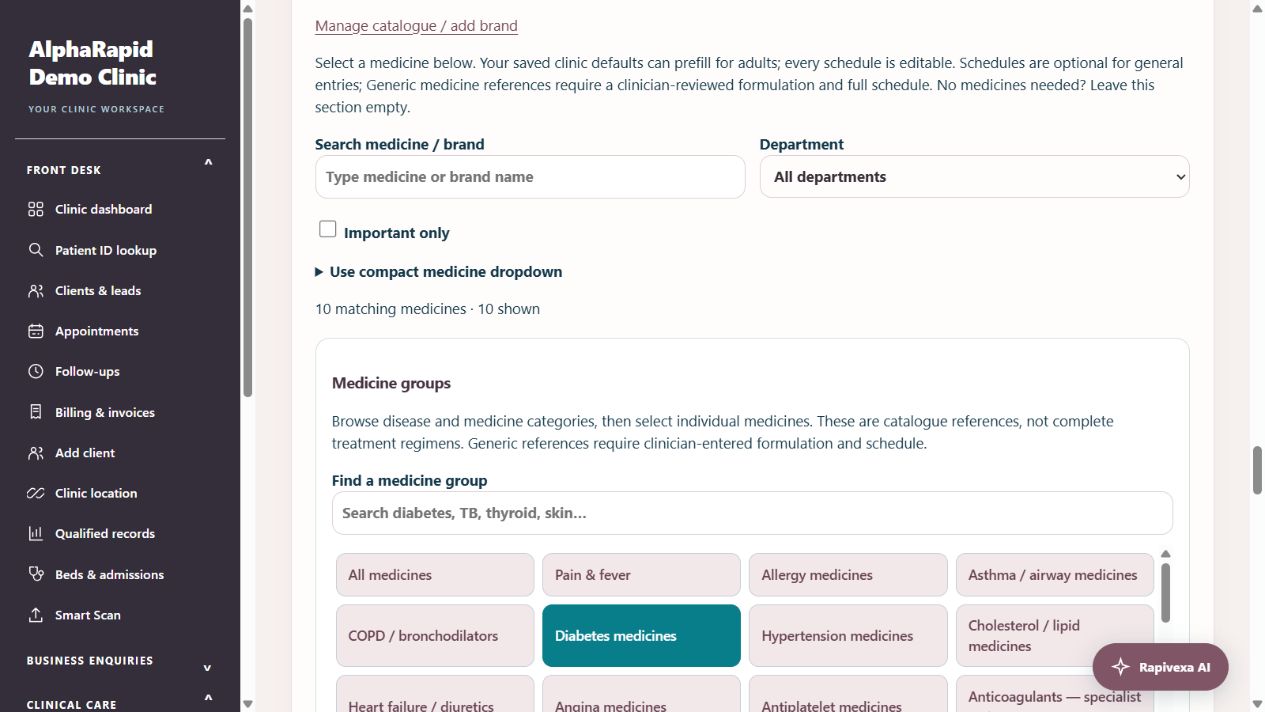
Step by step
- Open Clinical care → Doctor workspace → Patient → Write prescription → Prescription medicines → Medicine groups.
- Use Find a medicine group to search by disease, category or ingredient. Select the matching group. The panel scrolls independently on small screens; All medicines removes the group filter.
- Groups cover pain/fever, allergy, asthma/COPD, diabetes, hypertension, lipids, cardiac medicines, infections, TB, leprosy, malaria, parasites, gastrointestinal care, thyroid, gout/rheumatology, epilepsy, mental health, anaemia, neuropathy, urinary care, eyes, skin, hair, gynecology, obstetric references, bone health, dental care and specialist oncology/HIV references.
- Select an individual card, then review the actual formulation, strength, route and schedule. Generic references have blank formulations and schedules: enter these details before saving. Selecting a group never adds an entire regimen.
- Use Manage catalogue / add brand for your clinic formulations and brands. Existing inactive entries stay inactive; previous prescriptions are unchanged. Check the full draft and complete clinician confirmation before saving and printing.
Keep in mind
The catalogue has 435 formulation entries and 58 generic references. It is a curated browsing library, not every Indian brand or a complete formulary for all diseases. Country availability and licensed formulations vary.
Groups do not decide suitability, doses, treatment regimens or interactions. Oncology, HIV, anticoagulant and other specialist references require clinician-selected protocols and appropriate monitoring.
Related guides
Prescription writing: complete OPD and revisit guide
A practical guide for reception and doctors: record vitals, write a fast mobile prescription, reuse personal templates, review medicine changes, recover drafts and print.
Read guide →Patients & careDifferential diagnosis, investigations and medicine groups
Document suspected conditions separately, request investigations and choose individual medicine references.
Read guide →Patients & careRecord past history and department concerns
Use selectable history cards across all 15 specialties, then review the information before saving.
Read guide →Still need help?
Send your clinic code and the exact issue. Keep passwords and patient information private.
Request setup help · Free All guides