Record past history and department concerns
Use selectable history cards across all 15 specialties, then review the information before saving.
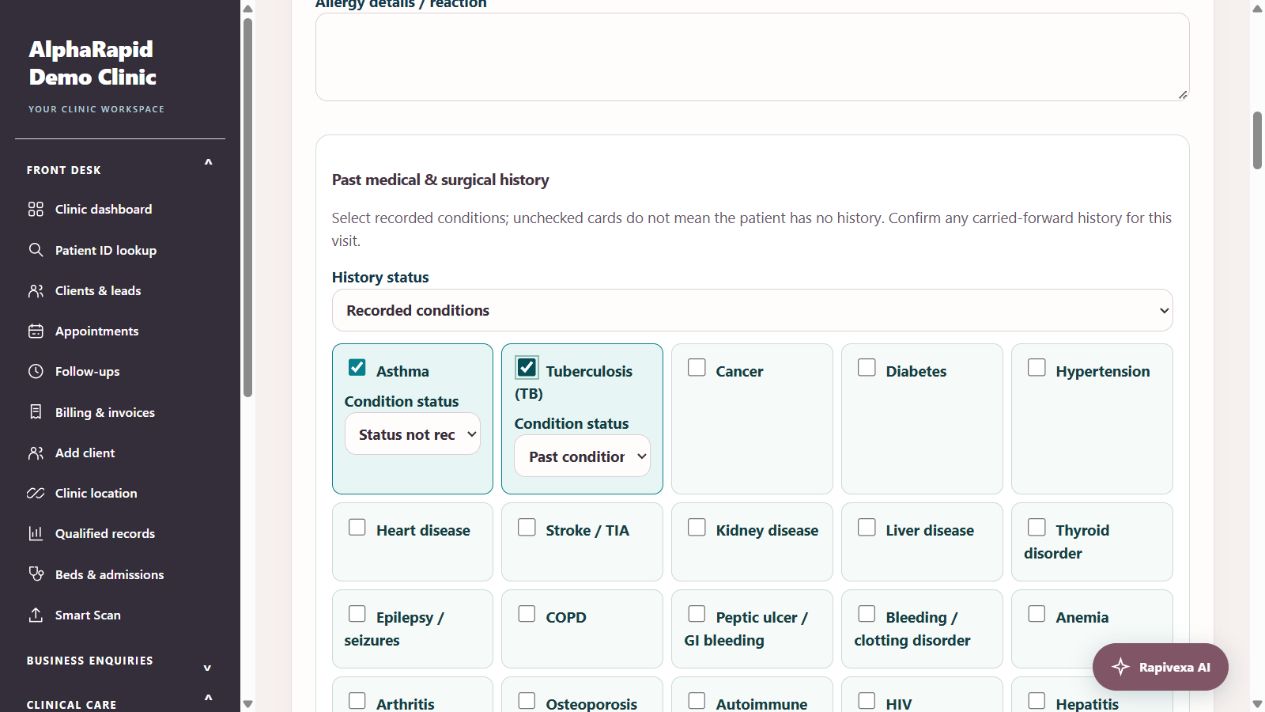
Step by step
- Open Clinical care → Doctor workspace → Patient → Write prescription → Consultation. Choose the specialty and treatment focus.
- In Past history, choose Not recorded, Unknown, None reported or Conditions recorded. Select relevant condition cards and record whether each is current, past or under treatment. Add details when needed; selecting a card does not diagnose the patient.
- Record allergy status separately and enter the drug and reaction where known. A blank field does not mean no allergy.
- Select relevant department concerns. These choices change with the selected specialty and describe information recorded for this visit.
- For Obstetrics & Gynecology, record G/P/A/L, LMP, clinician-confirmed EDD and its basis, gestational age, cycle and pregnancy status. Blank numbers remain unknown; explicitly enter zero when appropriate. Clear pregnancy dates for a new pregnancy and review all historical values.
- Saved allergies and past medical/surgical history load automatically for this patient on every new or blank prescription. Each section uses its latest recorded non-deleted prescription; later empty/default entries do not erase earlier background. Explicit Unknown, No known allergies or No relevant history statuses replace the earlier section after saving. Repeating an older prescription still uses current saved background. Current symptoms, pregnancy status/dates, gestational age, medicines and diagrams are not background defaults. A restored private draft retains your unsaved edits; compare them with the saved summary. Review every value before saving; earlier prescriptions stay unchanged.
- Select medicines from the catalogue cards and enter the clinician-approved instructions. An amber duplicate-name notice appears for repeated active medicine names, including different strengths. Review both rows; discontinued rows are excluded.
- Review the prescription, complete clinician confirmation and Save & preview. Check history, medicines and charts in the print preview before printing.
Keep in mind
The duplicate-name notice is not a full drug–drug interaction or contraindication checker and does not establish that a prescription is safe. Brand combinations and different names may not be detected.
No pregnancy dating, diagnosis, dose or treatment recommendation is inferred by these history cards. The prescribing clinician reviews every entry.
Related guides
Prescription writing: complete OPD and revisit guide
A practical guide for reception and doctors: record vitals, write a fast mobile prescription, reuse personal templates, review medicine changes, recover drafts and print.
Read guide →Patients & careAdd visual charts to a prescription
Select a location chart, mark findings and choose whether to print it.
Read guide →Patients & careReview a patient profile and history
Use the patient record to follow previous care.
Read guide →Patients & careSmart Scan: physical reports to digital records
Scan a photo or PDF, check the transcription and send it for clinical review.
Read guide →Still need help?
Send your clinic code and the exact issue. Keep passwords and patient information private.
Request setup help · Free All guides