Enable AI: clinic settings & record-sharing approval
A clinic-admin setup guide with the exact switches and save buttons.
Step by step
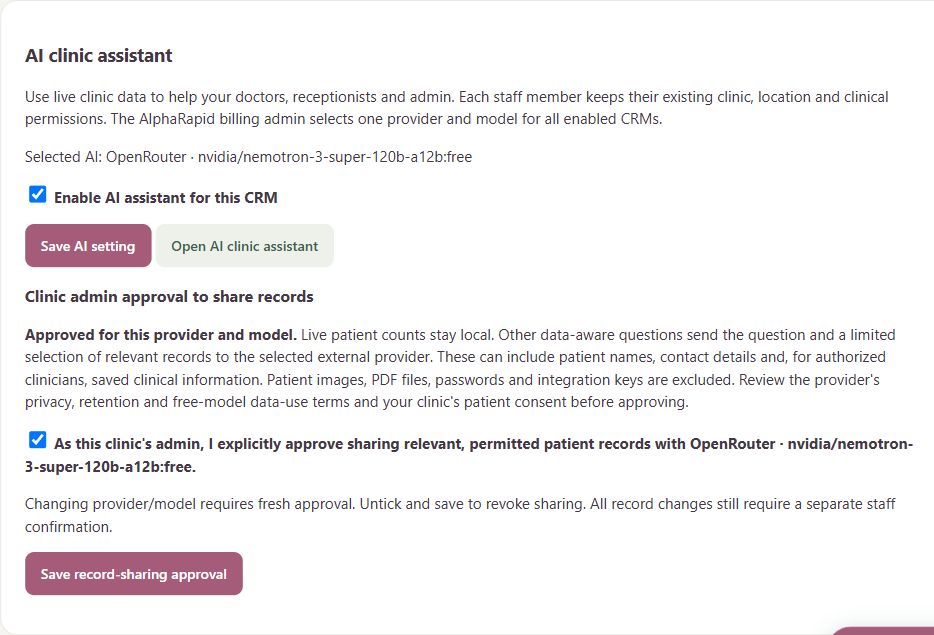
- Sign in as your clinic admin. Open Administration → Clinic settings → AI clinic assistant.
- If AlphaRapid has not configured the platform, contact AlphaRapid support. Clinic staff do not enter platform API keys; AlphaRapid manages the provider and model.
- Tick Enable AI assistant for this CRM and press Save AI setting. Enabling chat and approving record sharing are separate settings.
- Read Clinic admin approval to share records. Review the selected provider terms and your clinic patient-consent arrangements. To allow data-aware help, tick the approval checkbox and press Save record-sharing approval.
- Open AI clinic assistant or tap the floating Rapivexa AI button. Try Patient count, then a permitted record lookup. For registration or booking, review the card and explicitly confirm before saving.
- To stop chat, untick Enable AI assistant and save. To revoke record access, untick the record-sharing approval and save. A changed provider/model needs fresh clinic approval.
- If the button is missing, confirm with AlphaRapid that platform AI is enabled and configured, then verify your clinic switch and staff access. A provider error may require AlphaRapid to check API credentials, model availability or quota.
Keep in mind
Only clinic admins manage these clinic switches. Existing clinic, location and staff permissions apply. Reception cannot access clinical records. No per-message approval is needed once clinic approval is saved; clinical summaries require clinician review. Screenshots show a synthetic demo configuration, not a live activation.
Related guides
Clinic & team
Use your clinic AI assistant
Register clients, prepare appointments and ask about clinic records in one chat.
Read guide →Clinic & teamAlphaRapid admin: configure AI provider & model
Platform administration steps; clinic clients should ask AlphaRapid to complete this setup.
Read guide →Troubleshooting & safetyProtect clinic accounts and patient information
Everyday habits for shared clinic devices.
Read guide →Still need help?
Send your clinic code and the exact issue. Keep passwords and patient information private.
Request setup help · Free All guides