Meta WhatsApp Cloud API: fields and setup
Find the CRM settings, identify the credentials and understand the webhook prerequisite.
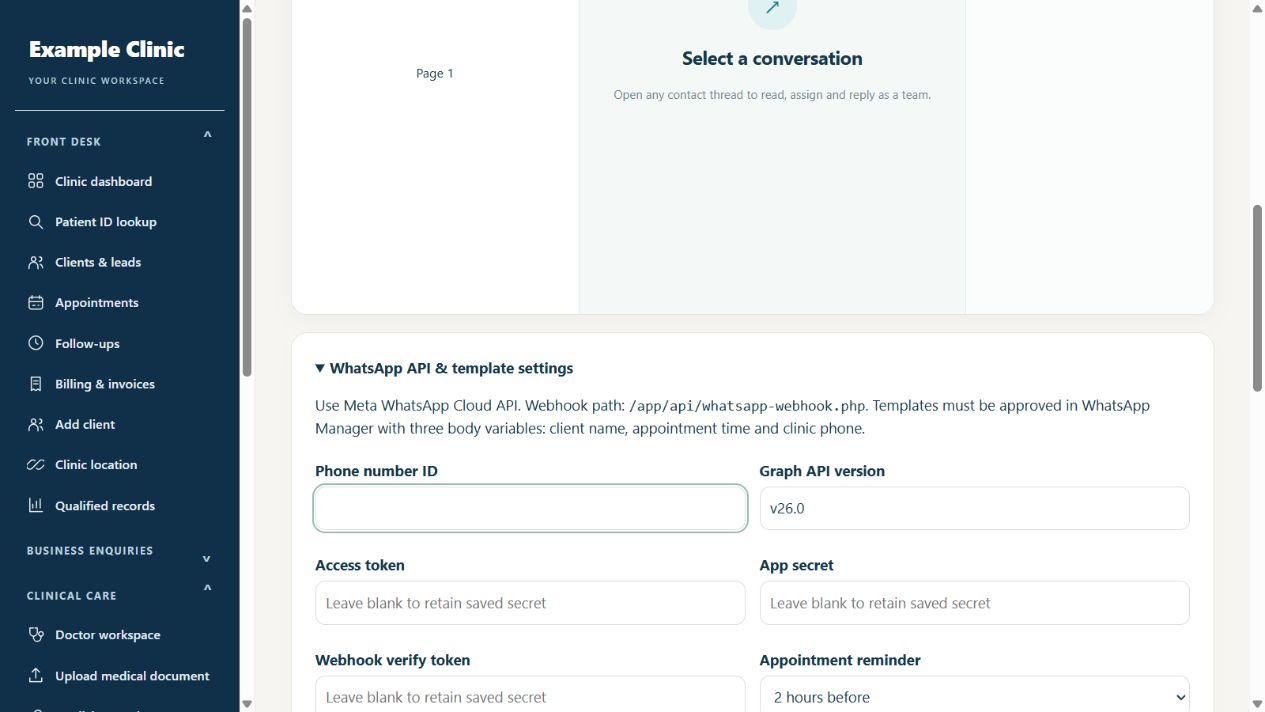
Step by step
- As clinic admin, open Communication → WhatsApp inbox. Expand WhatsApp API & template settings below the inbox.
- In your Meta developer account, open the WhatsApp product setup for your business app. Obtain the Phone number ID and an access token suitable for your production account. The phone number ID is not your phone number or WhatsApp Business Account ID.
- Enter Phone number ID, supported Graph API version, Access token and App secret in the CRM settings. Choose a webhook verify token privately; do not publish any of these secrets.
- Copy the full clinic-specific Callback URL shown under Incoming WhatsApp webhook. The Node application exposes /api/webhooks/whatsapp/YOUR_CLINIC_CODE. On hosting it must use your public HTTPS domain; do not use the old /app/api/whatsapp-webhook.php path.
- Save the CRM settings. In Meta WhatsApp Configuration, paste that Callback URL and the same saved verify token, then Verify and save. Subscribe to messages. For template approval updates, also save WABA ID in the CRM and subscribe to message_template_status_update.
- Create and obtain approval for the required message templates in your WhatsApp management account. Match each CRM event template name and language code to the approved template.
- Save settings, then have AlphaRapid verify an outgoing test, an incoming message and delivery status. Enable routine outgoing messages only after the complete connection is verified.
Keep in mind
The Node receiver verifies the original request signature and routes matching phone/WABA events into the same clinic inbox. Repeated incoming IDs are ignored. Media appears as a type/caption notice; attachments are not downloaded. Check Meta callback verification, last signed notification and last new incoming message separately. Outgoing sending off does not disable incoming events or STOP/UNSUBSCRIBE. Blank saved secret fields retain existing values; never share screenshots containing tokens. Local tests do not prove Meta delivery on your live domain; complete a controlled send/reply/delivery test after deployment.
Official provider references
Related guides
Connect WhatsApp and check message delivery
Provider setup and delivery status matter.
Read guide →Messaging & integrationsMeta integrations: choose the right setup
WhatsApp messaging and Facebook conversion reporting are separate connections.
Read guide →Troubleshooting & safetyContact AlphaRapid support with useful details
Help the team reproduce the issue without exposing private information.
Read guide →Still need help?
Send your clinic code and the exact issue. Keep passwords and patient information private.
Request setup help · Free All guides