Meta setup and clinic conversion reports
Configure eligible marketing integrations and measure enquiry-to-visit results inside your clinic.
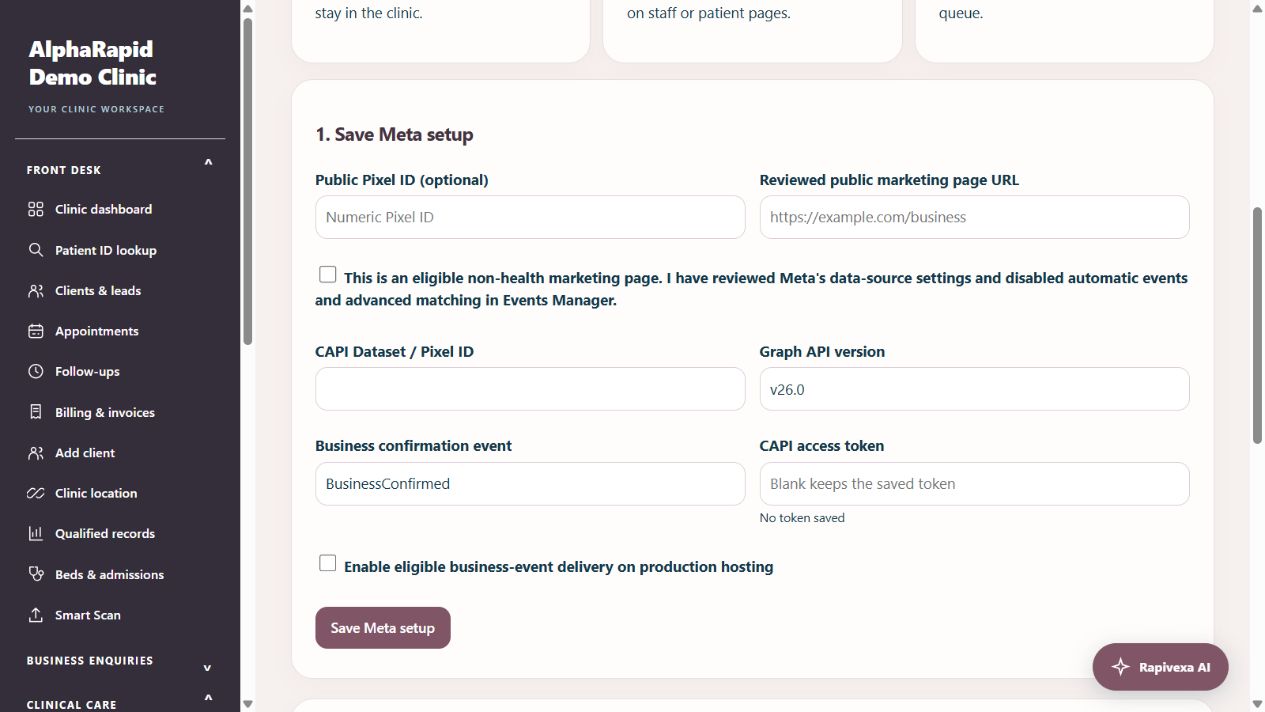
Step by step
- Clinic admin: open Clinic insights → Meta & ad tracking. Reception can open Clinic reports but cannot edit Meta credentials.
- Open clinic funnel or Campaign results. Select when enquiries were first received and group by source or source and campaign. Each client counts once per milestone, including repeat appointments. Missing campaigns appear as Unattributed; visit outcomes must be recorded by staff.
- For an eligible independent non-health business integration, enter the Dataset ID, access token, supported Graph API version and event name. Tokens are encrypted; leaving the token blank keeps it. Clinic records are not automatically exported.
- Copy a Test Events code from the selected Meta dataset, then Send synthetic test. Local previews validate the payload without sending. On configured production hosting, check both the saved API result and Meta Test Events. Only a synthetic email is used.
- For a reviewed eligible non-health public marketing page, save the Pixel ID and exact HTTPS URL, then download the Pixel script. Install it on that external website and connect its consent controls to rapivexaMetaConsent(true) or rapivexaMetaConsent(false). The script remains inactive until consent and runs only at the saved URL without query parameters.
- Review Business delivery status for independent supplier/partnership confirmations with explicit sharing consent. Patient contacts remain excluded. Production runtime, cURL, dataset permissions and live Meta acceptance need hosting verification.
Keep in mind
A saved Pixel ID means the snippet is ready, not that an external website has installed it. No Pixel runs inside staff/patient pages. Internal visit and campaign reports are not transmitted to Meta. API acceptance does not prove matching or advertising performance. Automatic delivery-worker operation remains hosting dependent.
Official provider references
Related guides
Messaging & integrations
Meta integrations: choose the right setup
WhatsApp messaging and Facebook conversion reporting are separate connections.
Read guide →Troubleshooting & safetyProtect clinic accounts and patient information
Everyday habits for shared clinic devices.
Read guide →Troubleshooting & safetyContact AlphaRapid support with useful details
Help the team reproduce the issue without exposing private information.
Read guide →Still need help?
Send your clinic code and the exact issue. Keep passwords and patient information private.
Request setup help · Free All guides