Set up email and other integrations
Connect only the services your plan and clinic require.
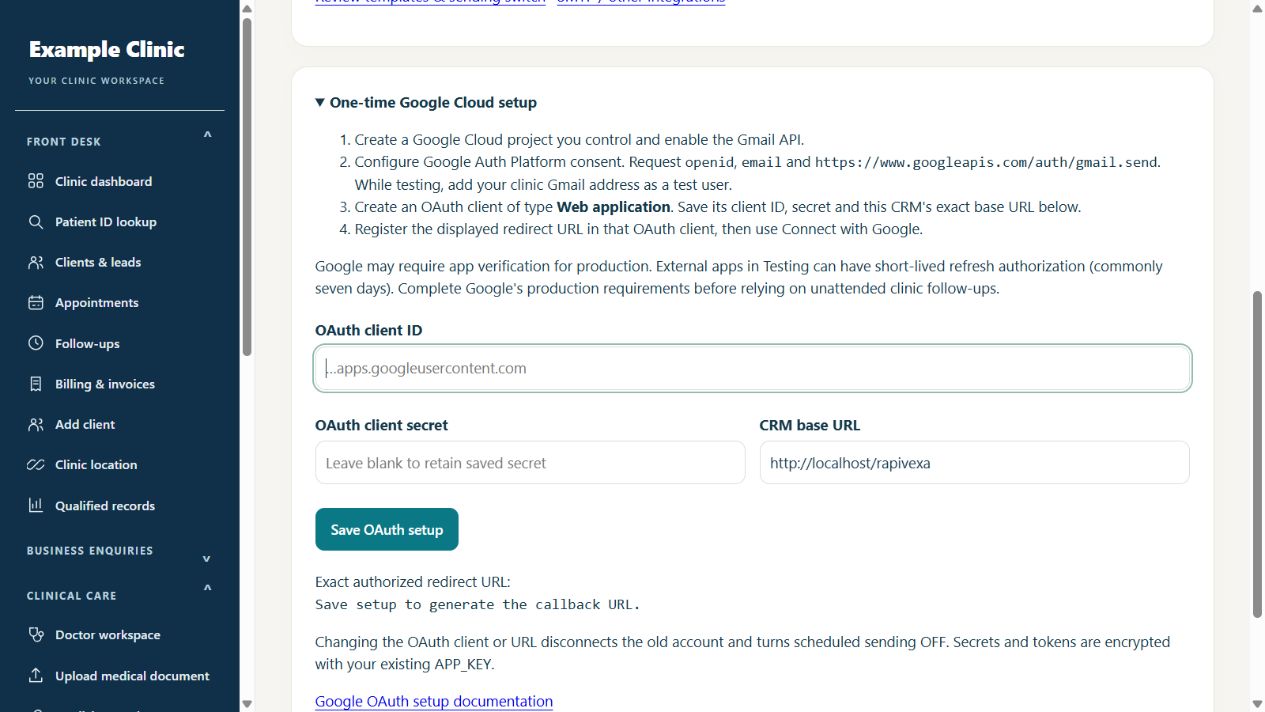
Step by step
- Check whether your plan includes Gmail / SMTP, Google Sheets or the integration you need.
- Open the relevant integration settings as an authorized admin.
- Follow the selected provider connection instructions and supply credentials privately in the settings form.
- Use the available test or connection check before relying on the integration.
- Review failed deliveries or sync results and ask support for help with the exact non-secret error.
Keep in mind
Some connections need provider authorization or hosting configuration. Saving settings is not proof that email delivery or synchronization works. Never paste provider secrets into a support message.
Related guides
Clinic & team
Why is a feature or record unavailable?
Check role, location and plan permissions first.
Read guide →Troubleshooting & safetyContact AlphaRapid support with useful details
Help the team reproduce the issue without exposing private information.
Read guide →Still need help?
Send your clinic code and the exact issue. Keep passwords and patient information private.
Request setup help · Free All guides