Past pending appointments: record the decision
Review overdue appointments first and record what happened without losing unresolved visits.
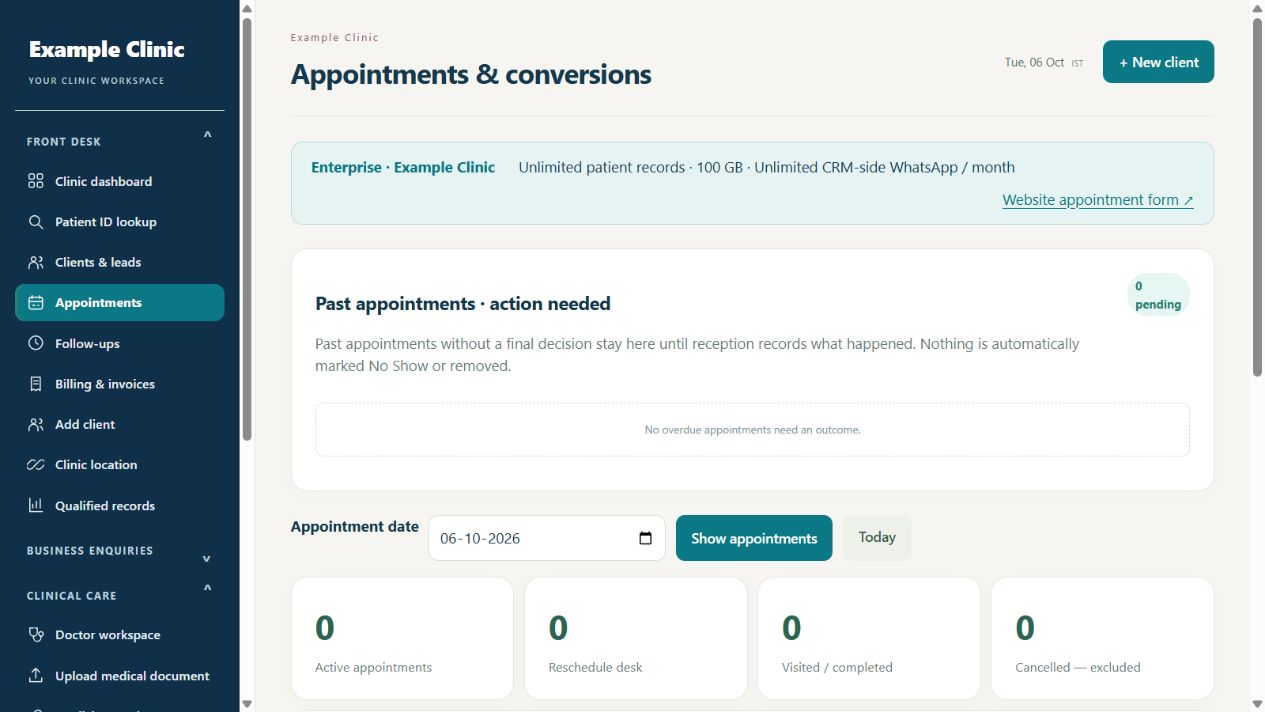
Step by step
- Open your clinic CRM → Front desk → Appointments. Past appointments · action needed appears above the date filter and daily totals.
- Review appointments whose time has passed and which still have Scheduled, Confirmed, Reschedule Requested or Rescheduled status. This queue includes earlier dates, independently of the daily date filter.
- As clinic admin, receptionist or senior doctor, use What happened? on the correct appointment. Choose Patient visited, Consultation completed, Patient did not attend, Cancelled or Reschedule based on the actual outcome.
- For Reschedule, enter a new future date and time. Check the patient and appointment before saving the outcome and confirming the action.
- After saving, check the refreshed queue and schedule. A final outcome removes the appointment from the pending queue; a future rescheduled appointment remains in the schedule and becomes pending again if its time passes without a final outcome.
- If there are more pending records, use Review all pending outcomes, then Previous or Next to review the remaining pages.
Keep in mind
Nothing is automatically marked No Show or removed because its time passed. Do not choose an outcome merely to clear the queue. Doctors without outcome-edit permission should ask reception or the clinic admin. Eligible notifications may be queued, but delivery depends on configured integrations.
Related guides
Appointments & follow-ups
Book and manage an appointment
Check patient, clinician, location and time before saving.
Read guide →Appointments & follow-upsReview website appointment requests
Turn an incoming request into a confirmed clinic booking.
Read guide →Appointments & follow-upsUse follow-ups and team assignments
Keep the next action and responsible person clear.
Read guide →Still need help?
Send your clinic code and the exact issue. Keep passwords and patient information private.
Request setup help · Free All guides